Tick DOM Heatmap: Reading the Tape Tick by Tick
A tick DOM heatmap paints live order book liquidity behind size-scaled trade bubbles — the bookmap-style chart for reading absorption, icebergs and spoofs.
A candlestick tells you that 4,000 contracts traded in the last minute and that price closed near its high. It does not tell you the one thing you actually needed: was that buying absorbed by a passive seller who is still sitting there, or did it clear the book and leave a vacuum above? Those two outcomes look identical on a candle and lead to opposite trades.
A tick DOM heatmap answers it directly. It drops candles entirely and paints two live layers on the same price axis: the resting order book over time, colour-mapped like a thermal image, and the executed tape on top of it as bubbles scaled by trade size. You stop reading a summary of the last minute and start watching the auction itself — wall forms, market orders arrive, wall holds or breaks, price reacts.
This guide is the practical walkthrough: what the two layers are, how to make them readable, which read-outs turn the picture into a decision, and the mistakes that cost new users their first week on it.
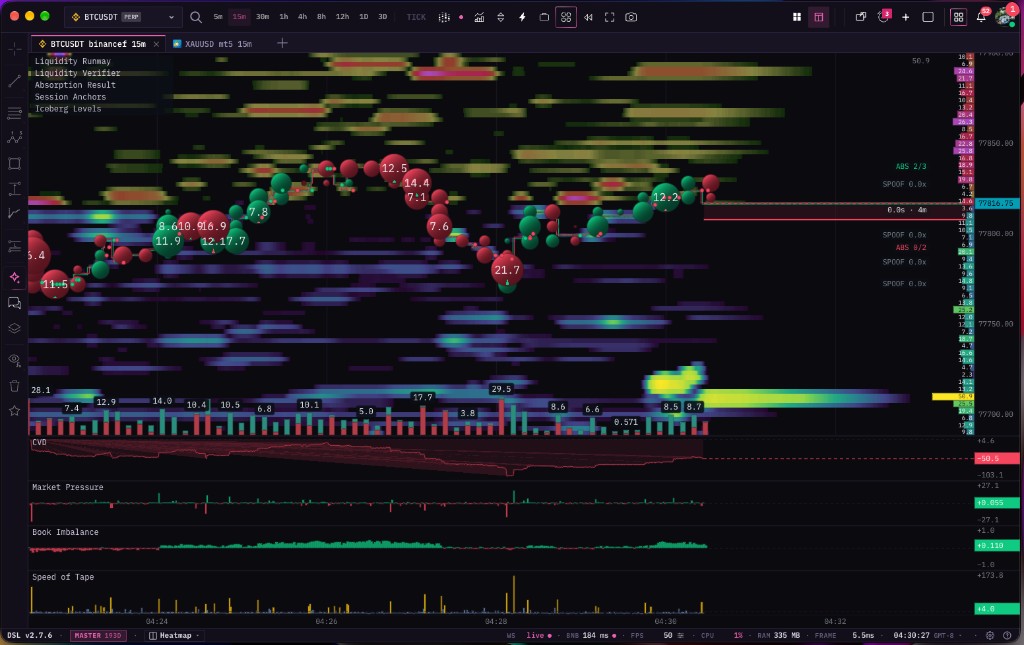 The whole surface in one frame: the heatmap is resting liquidity over time, the bubbles are completed trades sized by volume, the right edge flags absorption and pulled quotes, and the four panes underneath summarise pressure, imbalance and tape speed.
This article is part of the order-flow cluster. The pillar, Trading Chart with Depth Heatmap, covers the candle-based depth view; this one covers the tick-resolution view that sits one zoom level below it.
What a tick DOM heatmap actually shows
Two layers, one price axis. Read them separately before you read them together.
Layer one — resting liquidity (the DOM). "DOM" is depth of market: the limit orders waiting at each price, above and below the current trade. Every time the book updates, the chart writes one thin column. Bright means a lot of size resting at that price; dark means nothing is there. Because the columns persist, you are looking at the history of the book, not just its current state — so a wall that has defended one price for twenty minutes is visibly a long bright stripe, and a wall that appeared ten seconds ago is visibly a short one.
Layer two — the tape. Every completed trade is a bubble, placed at the price it printed and sized by how much traded. Green for buy-side aggression, red for sell-side. A 40-contract market buy is a big green circle; a one-lot is a dot. Large prints carry their size as a label so whales stay identifiable without hovering.
The combination is what makes it useful. The heatmap is intent — orders somebody placed and might cancel. The bubbles are commitment — money that actually changed hands. Watching commitment arrive at intent and seeing which one wins is the entire read.

Liquidity is not static. Walls build, get pulled, and rebuild somewhere else. A single snapshot of the order book cannot show you that; a heatmap of it over time can.
"Bookmap chart", "DOM heatmap", "tape heatmap" — one chart, several names
Worth clearing up, because the vocabulary is messy and it affects what you search for.
Traders say "bookmap" the way they say "ladder" for a DOM window or "footprint" for a volume-by-price cell grid: it has drifted from a product name into the everyday label for a chart type. So "bookmap chart", "bookmap style heatmap", "bookmap crypto" and "tape heatmap" are all people describing the same thing — a tick-resolution order book heatmap with the trade tape drawn over it.
Three names you will see for the layers themselves:
| What traders say | What it refers to |
|---|---|
| Bookmap / book map | The whole chart: depth heatmap plus tape bubbles |
| DOM heatmap / depth heatmap | The liquidity layer only |
| Tape / time and sales / prints | The executed-trade layer only |
Tape Delta ships this as a chart mode, not a separate application. In the terminal you pick Tick · Heatmap from the chart-type menu and the same canvas, the same symbol and the same drawings switch over — see the chart types documentation for the switch itself. It runs in a browser tab, so there is nothing to install and nothing that is Windows-only.
Making it readable: the controls that matter
The raw data has a brutal dynamic range. One price can hold a thousand times more size than its neighbour, so a naive rendering is a black screen with three bright lines. Getting a readable picture is the first skill, and it is mostly four settings.
Palette. Nine thermal ramps ship with the chart — Viridis, Plasma, Inferno, Magma, Cividis, Spectrum, Ocean, Ember and Mono — plus split bid/ask pairs (Green/Red, Amber/Ice, Teal/Magenta) that colour the two sides of the book differently instead of by intensity alone. This is not decoration. A perceptually even ramp like Viridis makes medium liquidity readable; a high-contrast ramp like Ember makes only the extremes pop. Which you want depends on whether you are hunting the biggest wall or mapping the whole shelf.
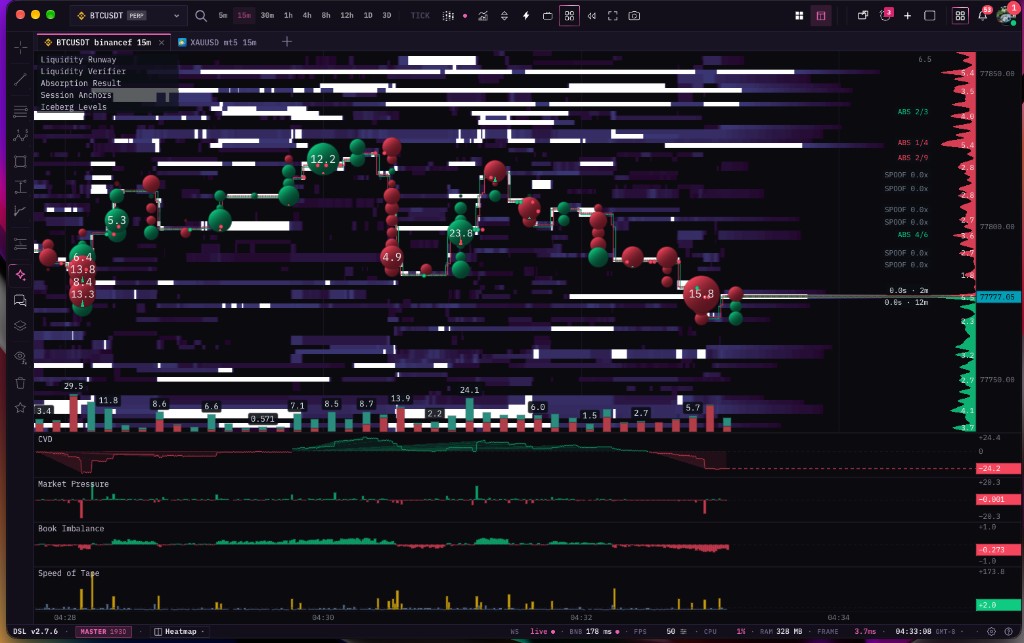 The same market on the Mono palette. Stripping hue out of the liquidity layer leaves colour free to mean one thing only — buy or sell aggression in the bubbles. Several absorption results are flagged at the right edge, and the depth profile curve shows where size sits right now.
Cut-off and brightness. A floor and a ceiling on what gets painted. Raise the floor and the retail noise disappears, leaving institutional size. Lower it and you see the whole shelf, including the thin zones that matter for a breakout. There is also a curve exponent and a colour-tier mode if you want the mid-range compressed or quantised into bands.
Smoothing. Zoomed out, every cell is sub-pixel and the map aliases into static. Smoothing can follow the zoom automatically or be pinned to one blur radius. Auto is right for most people; pin it when you want the picture to stay identical as you zoom.
Update cadence and retention. Cadence is how much time goes into one column — 500 ms, 1 s, 5 s, 10 s or 30 s. Fast cadence is micro-structure, slow cadence is a calm overview of the same session. Retention is how far back you can drag: 5, 15, 30 or 60 minutes. Both are explicit choices because they trade detail against how much the browser is holding.
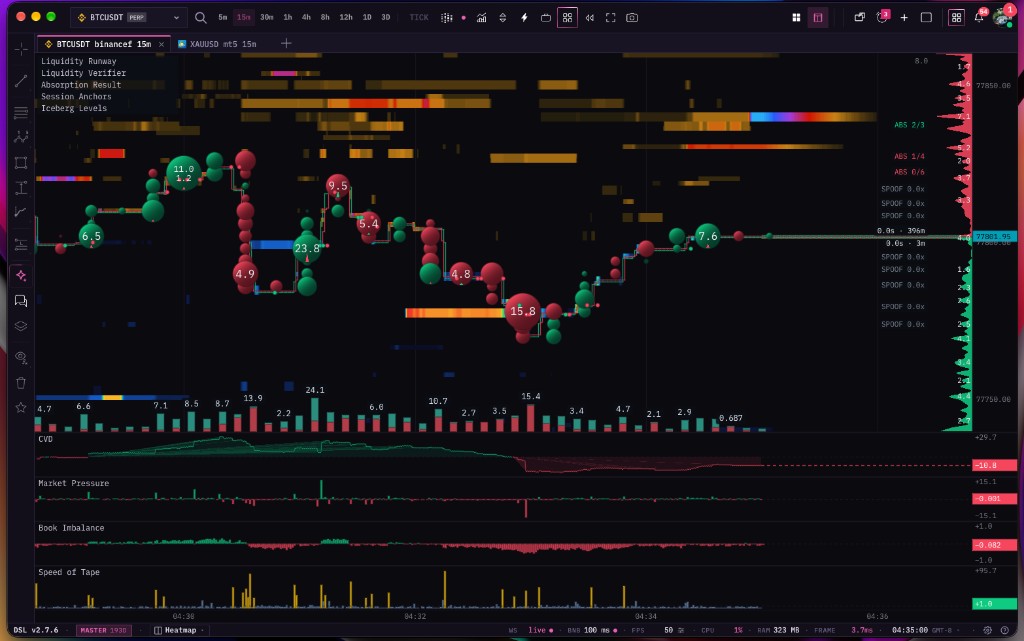 Ember with a raised cut-off: most of the book is suppressed and what remains is the size worth reacting to. The highlighted horizontal bar is a flagged iceberg level, and the strip along the bottom is per-bucket traded volume.
Three more layers you can turn on or off independently:
- Best prices — the live best bid and best ask drawn as two lines, so the spread is explicit while you read the depth around it.
- Volume strip — a histogram under the chart, per time bucket, switchable between volume, delta, trade count, bid or ask, with size labels.
- Depth profile — bars at the right edge showing the dominant resting walls right now, which is the snapshot view of the same book the heatmap is drawing historically.
The read-outs that turn the picture into a decision
A heatmap plus a tape is already a lot. The hard part is noticing the pattern while it happens rather than recognising it afterwards. That is what the on-canvas read-outs are for: each one watches a specific behaviour and marks it as it resolves.
Markers drawn on the chart
Liquidity Runway. Where the path of least resistance is. It looks for the stretch of thin book ahead of price versus the first real wall, so you can see whether a break has room to run or is about to hit a shelf two ticks later. This is the difference between a breakout that pays and one that stalls instantly.
Liquidity Verifier. The honesty check on every sizeable quote. It tracks what happened to the resting size when price arrived and labels the outcome: absorbed (price reached it and it filled), broken (it gave way), iceberg (it kept refilling), or spoof (it disappeared without ever being traded). Spoofed levels can be dimmed so your eye stops treating fake walls as structure.
Iceberg Levels. Hidden size, marked as its own level. An iceberg shows only a small slice and refills as it fills, so it never looks big in the book but keeps eating flow. Icebergs mark prices where a serious participant is working an order, and they are frequently where a move stops.
Absorption Result. The follow-through tracker. When absorption is detected, this watches what happened next and labels it held or failed — plus a running hit rate for the symbol and session. That last number is the honest one: it tells you how much today's absorption signals have actually been worth, instead of asking you to trust the pattern in the abstract.
Session Anchors. The structural frame underneath all the micro-noise: session VWAP with deviation bands, session POC and value area, and the session open, high and low. Micro-structure means very little without knowing whether you are above or below value, and this keeps that context on the same canvas.
Value Area, OHLC Plus and Price Change fill in the rest — a POC and value-area overlay for the visible window or a fixed interval, open/high/low/close reference lines, and a corner read-out of change in both percent and absolute terms.
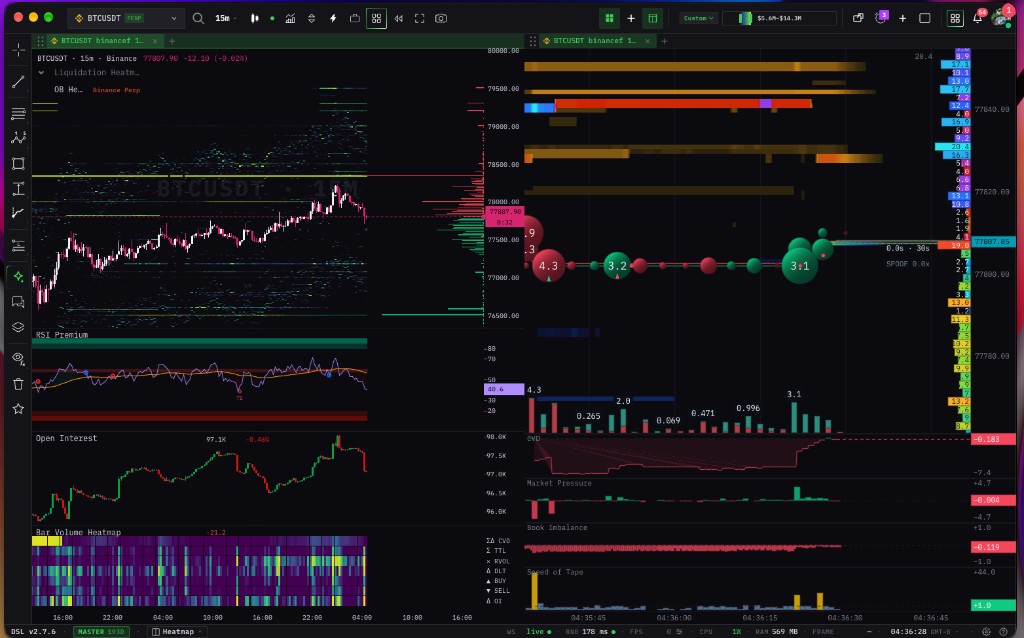 The layout most traders settle on: structure on the left (candles, liquidation heatmap, open interest, RSI), execution on the right (tick DOM heatmap and its panes). Both panes are live, on the same symbol, in one browser tab.
Panes under the chart
Four summaries that compress flow into a line you can read at a glance.
- CVD — cumulative volume delta: buys minus sells, accumulated. Rising CVD with flat price is the classic absorption tell, and it is the single most useful companion to the heatmap. The CVD profile guide goes deeper on reading it.
- Market Pressure — net aggression right now, so you can see a shift from buy-led to sell-led flow without counting bubbles.
- Book Imbalance — how lopsided the resting book is within a chosen depth around the mid. Persistent one-sided imbalance is the passive counterpart to CVD's aggressive read.
- Speed of Tape — how fast prints are arriving, with bursts highlighted. Speed is the attention signal: nothing important happens slowly, and a burst is usually the first notice that a level is being tested for real.
Each pane is a real pane, so it zooms and scrolls on its own axis and double-clicks back to auto-fit, exactly like the indicator panes on the candle chart described in the indicator panel documentation.
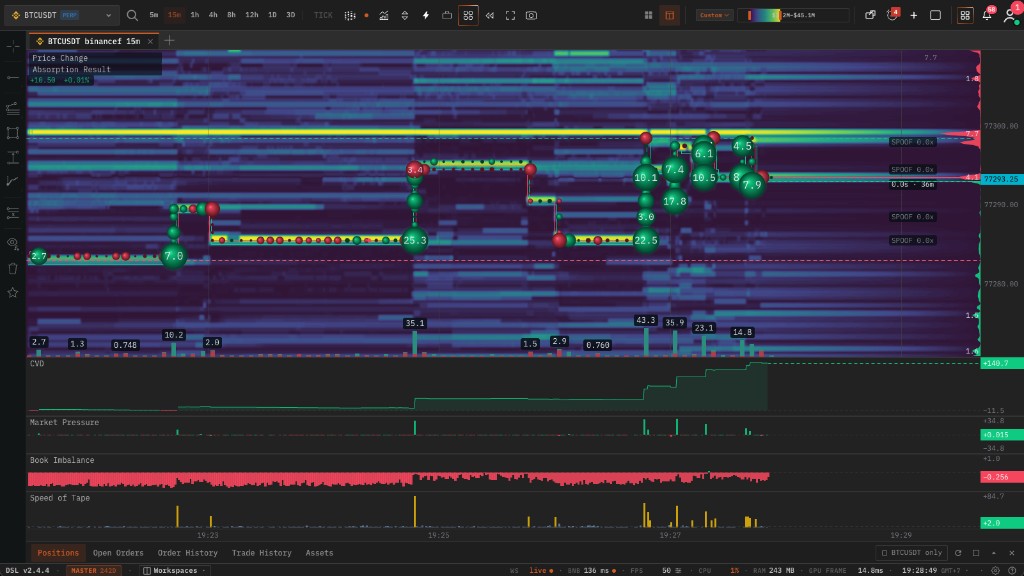 A different palette and a lower cut-off: more of the book is visible and the bubble chain makes the sequence of aggression easy to follow print by print.
Markers and alerts
Sweeps and absorption events can be drawn as arrows and rings with a minimum strength filter, and the same events can raise a toast and a short beep. The point is not automation — it is that you cannot stare at one symbol continuously, and the events worth looking up for are rare enough that an alert is the right interface for them.
Advanced: a five-step read
The order matters. Most bad decisions on this chart come from reading step four before step one.
- Where are you in the session? Session anchors first. Above value with a thin book above is a different market from the same pattern below value.
- Where is the size? Find the bright stripes and the dark bands. The dark bands are where price travels fast; the bright stripes are where it has to work.
- Is the size real? Check how long a stripe has persisted and what the verifier says about it. A twenty-minute wall and a ten-second quote look similar in a screenshot and mean opposite things.
- Is flow arriving? Watch the bubbles and the tape-speed pane. No flow means no test, and a level nobody is testing tells you nothing.
- Who won? This is the decision point. Flow into a wall that holds, with CVD climbing and price flat, is absorption — the passive side is winning. Flow that clears the wall and leaves the row dark is a break — the aggressive side is winning. Everything before this step was preparation for telling those two apart.
Then size the trade off the structure you just read: the absorbed level is your invalidation, and the next bright stripe is your realistic target, because that is where the market will have to work again.
Advanced: pairing tick resolution with candle structure
Tick resolution is the wrong tool for deciding what to trade. It has a one-hour memory at most and no concept of yesterday's range. Use it for when.
The workflow that holds up: find the level on the candle chart, with the orderbook heatmap for resting liquidity across the longer window and the liquidation heatmap for where forced flow is likely to come from. Then switch the execution pane to tick resolution and let it answer one question: is the level defended right now, or is it hollow? The candle view gave you a price; the tick view gives you the moment.
If you want the per-level numbers rather than a picture, the DOM ladder is the companion read — the same book expressed as resting size and per-level delta, price by price. And for what happened inside each completed bar, the footprint chart is the retrospective version of the same information.
Common mistakes
Trading the heatmap without the tape. A bright stripe is an offer, not an outcome. Levels get pulled constantly. Until commitment arrives — bubbles, tape speed, CVD moving — the stripe is a hypothesis. Most early losses on this chart are entries taken against walls that were never tested and then simply vanished.
Leaving the cut-off at default and concluding "it is just noise". The first hour on a tick DOM heatmap is almost always a calibration problem, not a reading problem. Raise the floor until only size you would actually react to is painted. Most people set it far too low, see everything, and therefore see nothing.
Running the fastest cadence all day. 500 ms is a microscope. It is correct for the thirty seconds around an entry and exhausting for the four hours before it. Slower cadence with longer retention is the better default; speed it up when something is happening.
Treating every pulled quote as manipulation. Market makers cancel and re-quote constantly as a normal part of managing risk. What matters is the pattern: the same price getting a large quote that always disappears before it trades is information. A single cancel is not.
Expecting it to predict. It does not forecast. It tells you, with less lag than anything else on the screen, what is happening right now — who is passive, who is aggressive, and who just won a specific level. That is an execution edge, not a crystal ball, and traders who go looking for the latter usually end up over-trading a tool that was giving them good answers to a narrower question.
Reading it on an illiquid symbol. Micro-structure needs participants. On a thin altcoin the book is a handful of quotes and the tape is sporadic, so the patterns above are mostly artefacts. Use it where there is a real auction.
Where to go from here
- Trading Chart with Depth Heatmap — the pillar: the candle-based depth view and the patterns that read across longer windows.
- How to Read an Orderbook Heatmap — walls, vacuums, spoofs and stacked accumulation, with worked examples.
- How to Read the DOM Ladder — the numeric companion: resting size and per-level delta, price by price.
- What Is a Footprint Chart? — order flow inside completed bars, and how it pairs with the tick view.
- Trading with CVD Profile — the absorption read in depth.
- Tape Delta: the Order Flow Terminal — how the chart modes, panes and widgets fit together in one workspace.
To see it live, open the terminal at app.tapedelta.com, pick a liquid symbol, and switch the chart type to Tick · Heatmap. Raise the cut-off until only size you care about is painted, turn on CVD and Speed of Tape, and watch one level get tested. That is the whole lesson, and it takes about ten minutes.
This article is education, not financial advice. Trading involves risk, and order-flow tools describe what is happening in the market — they do not predict what happens next.